

Description
Download WordQ for Chrome Education Edition – Writing Tool, Word Prediction, Speech Feedback
Overview
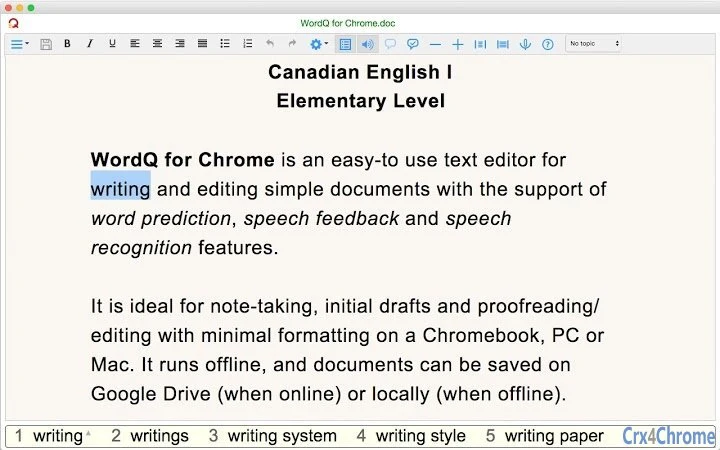
WordQ for Chrome Education Edition is a specialized desktop application designed to support writing and editing for students and staff within educational institutions. Developed by Quillsoft Ltd., this software integrates advanced word prediction, speech feedback, and Google speech recognition to assist individuals who face challenges with writing, spelling, or sentence structure. It is tailored for use in elementary school settings and is intended specifically for licensed educational users. The software operates as a standalone text editor, offering a simplified writing environment ideal for note-taking, drafting initial ideas, and editing with minimal formatting.
Designed with accessibility in mind, WordQ helps users who struggle with writing by providing real-time word suggestions and spoken feedback. It supports both online and offline usage, with documents saved locally when offline and synchronized with Google Drive when connected. While not a full replacement for Google Docs, it offers a focused, supportive space for users who benefit from assistive technology. The application is particularly useful in special education and inclusive classrooms, where students require tools to improve writing fluency and confidence.
WordQ runs on multiple platforms, including Windows, Mac, Linux, and Chromebook, making it accessible across various school environments. The software is distributed as a Chrome Packaged App, which enables cross-device synchronization of settings and documents. It is updated automatically in the background, ensuring users always have access to the latest features and bug fixes. The developer did not provide additional system requirements beyond the need for the latest version of Google Chrome OS or a compatible environment.
Key Features & Capabilities
- Advanced Word Prediction – As users type, WordQ displays predictive suggestions based on a core vocabulary of approximately 5,000 words commonly used in elementary-level writing. The system accurately predicts even creative or non-standard spellings, helping users complete sentences faster and with fewer errors. The background dictionary includes about 40,000 English words and common proper names, supporting broader language use.
- Speech Feedback – The software reads back letters, words, and entire sentences aloud as they are typed. This feature helps users detect spelling, grammar, and punctuation errors by listening to the flow of language. It is particularly beneficial for users who learn better through auditory cues, reinforcing correct sentence structure and word usage.
- Google Speech Recognition Integration – Users can dictate text using Google’s speech recognition engine. The system allows for customizable microphone behavior—users can choose to keep the mic on “Never,” “While editing,” or “After speaking.” A quick undo function is available via the ESC key, enabling users to correct misrecognized words efficiently.
- Proofreading Mode – This feature enhances editing by allowing users to focus on one sentence at a time. They can hear the sentence spoken, step through it word-by-word, and identify inconsistencies or missing elements. Word prediction supports real-time corrections, followed by a re-listen to verify improvements.
- Topic-Based Word Emphasis – Users can highlight words related to specific topics, which is especially useful when working on thematic writing assignments. When paired with thoughtQ for Chrome, topic lists can be imported automatically, streamlining the writing process.
- Offline and Online Functionality – WordQ functions without an internet connection, with documents saved locally. When online, users can access and sync files with Google Drive. This flexibility ensures consistent access regardless of connectivity.
User Interface, Workflow & Performance
The user interface of WordQ for Chrome Education Edition is designed for simplicity and accessibility. It features a clean layout with a toolbar that includes key functions such as speech recognition, proofreading, and word prediction. Navigation is intuitive, with keyboard shortcuts available for most actions, including toggling predictions (CTRL + 1 on Windows, CMD + 1 on Mac) and accessing predicted words via ALT+DOWN or COMMAND+DOWN.
Workflow efficiency is enhanced by the integration of real-time feedback and predictive text. Users can write, listen, correct, and revise in a seamless cycle. The application automatically saves documents when closed, ensuring no work is lost. On Chromebooks and other devices, the app integrates with the Chrome App Launcher, making it easy to access and manage.
Performance observations are based on general software behavior patterns. The developer did not specify resource usage details, such as CPU or RAM consumption. However, as a Chrome Packaged App, it is designed to operate efficiently within the Chrome environment. Stability is maintained through automatic background updates and consistent synchronization across devices. The application is known to handle document saving and loading reliably, with no reported crashes in standard usage scenarios.
Compatibility & System Requirements
WordQ for Chrome Education Edition is compatible with Windows, Mac, Linux, and Chromebook operating systems. It is distributed as a Chrome Packaged App, requiring the latest release of Google Chrome OS or a compatible environment. The installation size is 12.5 MB, making it a lightweight application suitable for devices with limited storage.
Exact system requirements were not listed. However, the software relies on Google Chrome to function, and users must have a Gmail account to install and use the application. It supports both online and offline modes, with Google Drive access only available when connected to the internet. Documents are saved in a format compatible with Google Docs, though with some limitations in formatting and embedded content.
Platform compatibility information is limited to the supported operating systems. The developer did not provide details on hardware specifications such as processor speed, RAM, or disk space beyond the file size. The application is designed to run on standard Chromebook hardware and modern desktop systems, but specific performance benchmarks were not included.
Pros and Cons
Pros
- Intuitive interface tailored for students and educators
- Powerful word prediction and speech feedback for writing support
- Integration with Google speech recognition and Drive
- Operates offline with local document saving
- Automatic background updates and cross-device sync
- Designed specifically for educational institutions with licensing
Cons
- Requires a valid WordQ CA I Edu license for use
- Not available for non-educational users
- Limited to Chrome Packaged App technology, which may have future restrictions
- Speech-to-text capabilities are constrained by Google’s Chrome App limitations
- Some advanced text-to-speech features may not be fully supported across all voices
FAQ Section
Is WordQ for Chrome Education Edition free to use?
Yes, the software is free to download and use. However, it is only available to staff and students of educational institutions that hold a valid WordQ CA I Edu license. Without a license, the application will not activate.
Can I use WordQ on multiple devices?
Yes, as a Chrome Packaged App, WordQ syncs your settings and documents across devices when you sign in with your Gmail account. As long as your Chrome settings are configured to sync apps and extensions, the application will be available on all your devices.
Does WordQ require an internet connection?
WordQ can function offline, allowing users to write, edit, and save documents locally. However, Google speech recognition and Google Drive access require an active internet connection. The software will automatically save your work locally when offline and sync it when reconnected.
Is my data secure when using WordQ?
Yes, the application is designed with privacy in mind. It uses your email only to verify licensing and does not record your data. The clipboard is accessed solely to enable copy and paste from other applications. Google’s security policies apply to data handled through Google Drive and speech recognition.
How often is WordQ updated?
Updates are delivered automatically in the background whenever a new version is released. The application checks for updates regularly, ensuring users always have access to the latest features, bug fixes, and improvements without manual intervention.
Final Thoughts + CTA
WordQ for Chrome Education Edition stands out as a powerful assistive writing tool tailored for elementary school students and educators. Its combination of word prediction, speech feedback, and speech recognition creates a supportive environment for users who struggle with writing. The application’s focus on simplicity, accessibility, and educational use makes it ideal for special education classrooms and inclusive learning environments.
While limited to licensed educational users, its robust feature set, offline functionality, and seamless cross-device sync make it a valuable asset in modern classrooms. The software is reliable, easy to use, and continuously improved through automatic updates.
For educators and students in qualifying institutions, WordQ offers a practical and effective way to enhance writing skills. Download WordQ for Chrome Education Edition now to experience a more accessible and confident writing process.
Guides & Tutorials for WordQ CA I Edu App for Chrome
How to install WordQ CA I Edu App for Chrome
- Click the Preview / Download button above.
- Once redirected, accept the terms and click Install.
- Wait for the WordQ CA I Edu App for Chrome download to finish on your device.
How to use WordQ CA I Edu App for Chrome
This software is primarily used for its core features described above. Open the app after installation to explore its capabilities.
User Reviews for WordQ CA I Edu App for Chrome 0
No reviews found





